

CLI and tools
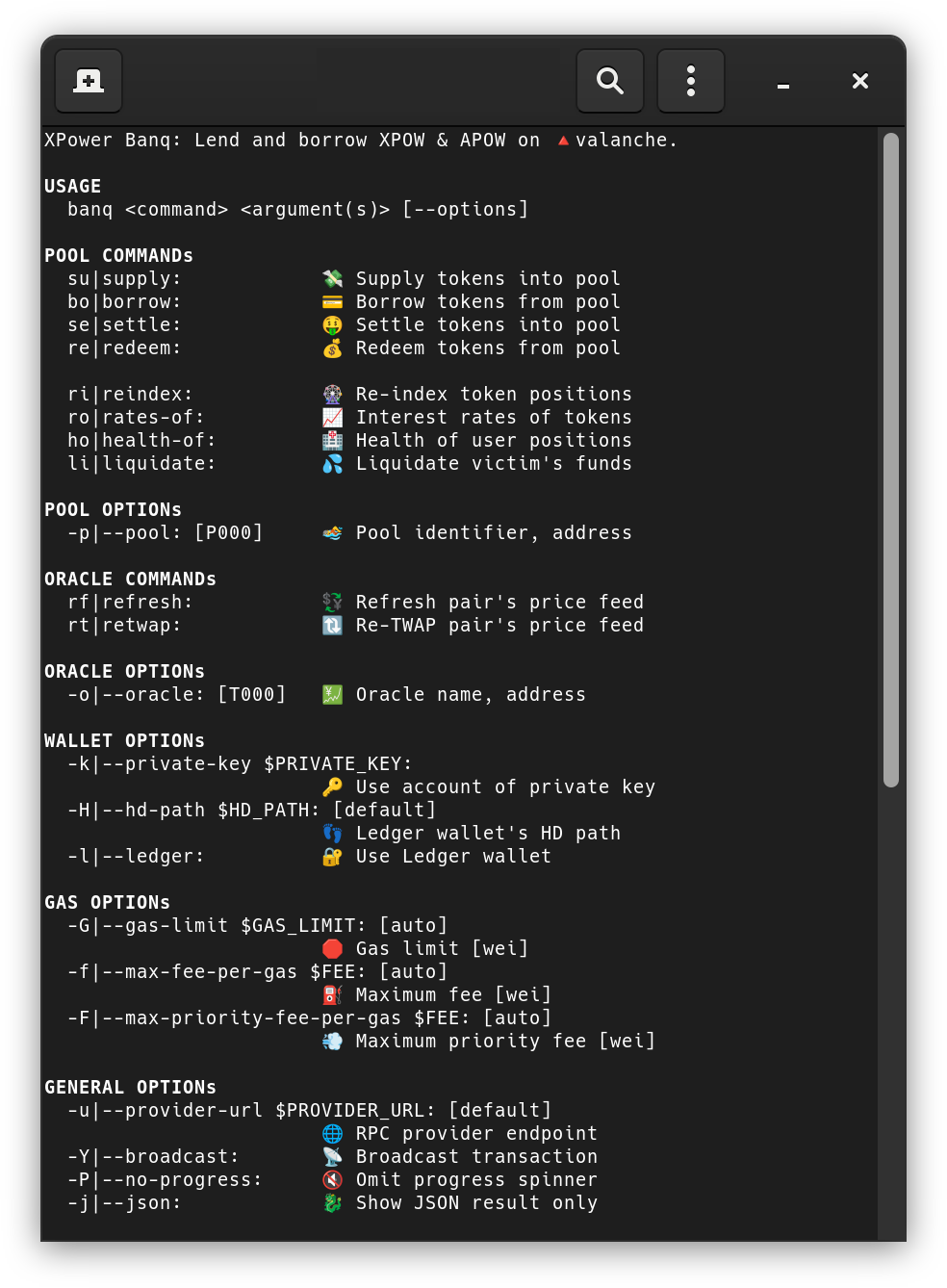
banq-cli is the official command-line interface for XPower Banq. It's a single Deno-built binary that covers the full surface of the protocol: keeper operations (liquidate, oracle refresh, ACMA inspection), user operations (supply, borrow, settle, redeem), and the auxiliary XPOW mining / APOW claiming flows. Most pages elsewhere in this section assume you have it installed.
This page is filed under "For keepers" because keepers are the heaviest CLI users — the GUI is sufficient for ordinary supply/borrow flows, but liquidations, oracle refreshes, and role inspection are CLI-first.
Install
banq-cli is built with Deno v2.0+. Build from source or grab a prebuilt binary from the GitHub releases.
# from source
deno run install
deno run build-banq

# install
sudo cp ./dist/banq-mainnet.x86_64-linux.run /usr/local/bin/banq
sudo chmod +x /usr/local/bin/banq

banq --help
Pre-built artifacts ship for x86_64 Linux/macOS/Windows plus aarch64 Linux/macOS.
Configuration
| Variable | Purpose |
|---|---|
PROVIDER_URL | Avalanche C-Chain RPC. Default: https://api.avax.network/ext/bc/C/rpc. |
PRIVATE_KEY | Signing key for write operations. Optional — Ledger hardware wallets are also supported. |
CONTRACT_RUN | Protocol-deployment selector. Default v10c; set to v10c for the current mainnet. |
Environment variables are loaded from (in increasing precedence): etc/banq/banq.env.mainnet, .env.mainnet, .env.mainnet.local (and analogous files for testnet).
Never pass keys as CLI arguments A PRIVATE_KEY on the command line
is visible to anyone with ps aux. Always export it (with a leading space, to skip shell history): export PRIVATE_KEY=0x.... Better still, use Ledger. :::
Dry-run by default
Every write command is a dry-run unless you pass -Y / --broadcast. The CLI will still build, simulate, and report the result of the call — it just won't sign and send. This makes the tool safe to explore: you can copy commands from this page and run them against mainnet without risking funds.
banq supply 1.0 APOW --pool=P000              # dry-run
banq supply 1.0 APOW --pool=P000 -Y           # actually sends
Keeper commands
These are the highest-leverage commands for a running keeper.
liquidate — debt-assumption liquidation
banq liquidate $VICTIM [--pool=P000] [-Y]Liquidates the underwater account $VICTIM in the chosen pool. The CLI calls the public, PoW-gated entry point Pool.liquidate(victim, partial_exp); the contract enforces difficulty against the caller's recent XPOW activity via the powlimited modifier (no per-call mining is performed by the CLI). The role-restricted direct path Pool.square(user, victim, partial_exp) — gated by the pool's POOL_SQUARE_ROLE (a per-pool role) — is reserved for keepers operating under explicit ACMA grant and is not currently exposed as a separate CLI subcommand. See Debt-assumption liquidation.
health-of — query a position's health factor
banq health-of $USER [--pool=P000]Read-only. Useful as the basic monitoring primitive — the response includes weighted supply value, weighted borrow value, and the resulting H.
retwap — recompute the TWAP
banq retwap XPOW APOW [--oracle=T000] [-Y]Refreshes the log-space TWAP for the given pair. Oracle.retwap(source, target) is restricted — the role check is FEED_RETWAP_ROLE.
refresh — refresh a price feed
banq refresh XPOW APOW [--oracle=T000] [-Y]Drops a fresh sample into the underlying source feed. The on-chain Oracle.refresh(source, target) is PoW-gated (powlimited(refreshDifficulty())) and rate-limited via a delayed(...) modifier — i.e. permissionless but throttled.
rates-of — interest-rate snapshot
banq rates-of XPOW [--pool=P000]              # current
banq rates-of XPOW [--pool=P000] --at=all     # full history
Reports current supply / borrow rates plus the parameters that produced them. With --at=all, replays the rate history (useful for plotting; pair with etc/plot-rates.py).
acma — ACMA inspection
banq acma                          # show authorisation matrix
banq acma roles                    # all roles with metadata
banq acma members [-a]             # role members + execution delays
banq acma targets                  # selector → role mapping
banq acma hierarchy                # admin/guard tree
banq acma delays [-a]              # grant + admin delays
banq acma logs [-n 50] [-e ...]    # chronological event log
The single most useful command when reasoning about a "who can do what when" question — particularly during incident response.
User-side commands
banq supply  1.0 APOW [--pool=P000] [-Y]
banq borrow  1.0 XPOW [--pool=P000] [-Y]
banq settle  1.0 XPOW [--pool=P000] [-Y]
banq redeem  1.0 APOW [--pool=P000] [-Y]
banq reindex     APOW --mode=supply  [--pool=P000] [-Y]
banq reindex     XPOW --mode=borrow  [--pool=P000] [-Y]
reindex advances the per-position log-space index — useful before reading balances if precise accrued interest matters more than gas.
Mining and claiming
The XPOW mining pipeline is composable via stdin/JSON, so the standard pattern is to mine on a hot box and submit from a cold one:
banq xpow-init [-Y]                                   # once per hour
banq xpow-mine [-Y] -Pj --pow-level=8 | nc 127.0.0.1 8765
nc -l 8765 | banq xpow-mint [-Y] -Pj \
  --max-priority-fee-per-gas=0 \
  --max-fee-per-gas=500000000 \
  --gas-limit=100000

banq apow-claim       APOW --nft-id=202500            [-Y]
banq apow-claim-batch APOW --nft-id=202500,202503     [-Y]
Where to go next
- Running a liquidator — production-keeper checklist
- Monitoring and tooling — what to watch
- Contract addresses —
--pool=PNNNand--oracle=TNNNselectors